Adding a New Client |
  
|
Adding a New Client |
|
Select the Clients > A. Maintain Clients and then select the Add button

‘Reference’ - Each Client requires a unique reference, if you are exporting invoices to Sage, they must match Sage A/C Ref exactly. If you do not have a reference policy the standard is the first 3 characters of the client name and 001 i.e. for British Water BRI001 when you start another account starting BRI it becomes BRI002.
Select the Invoice Set-Up tab
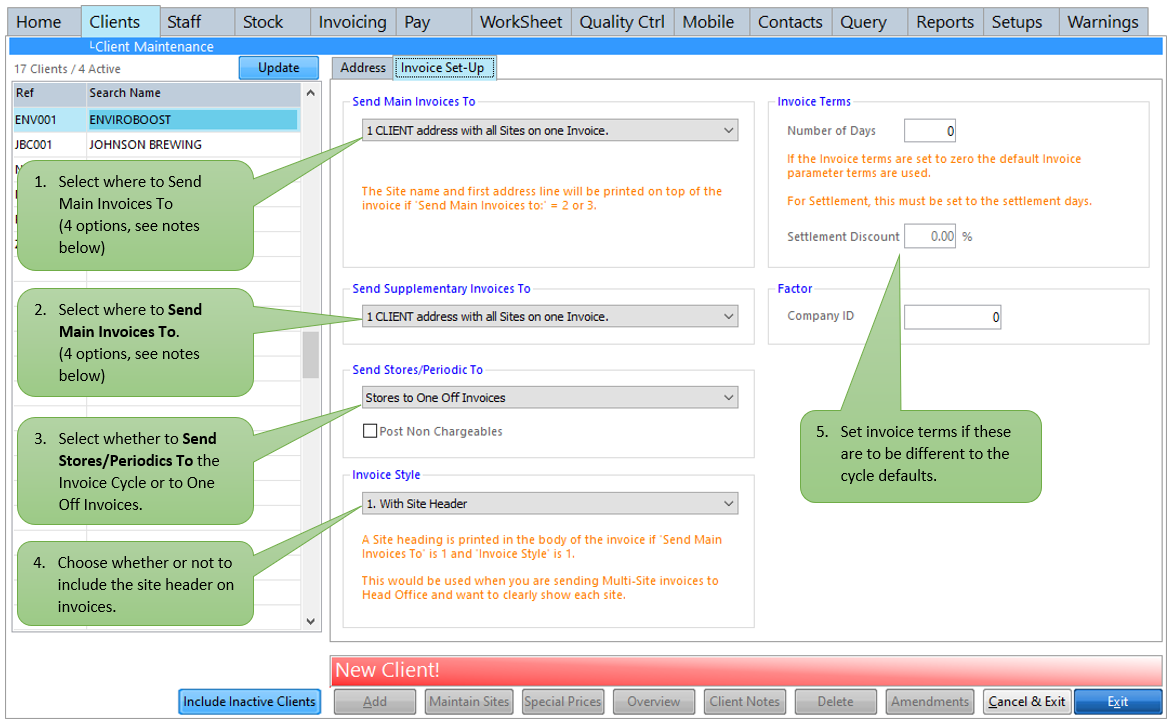
Send Main Invoices To:
1. CLIENT address with all Sites on one Invoice.
2. CLIENT address with each Site on a separate Invoice.
3. SITE address with separate Invoice for each Site.
4. SITE address with periodics summarised on one Invoice
Send Supplementary Invoices to:
1. CLIENT address with all Sites on one Invoice.
2. CLIENT address with each Site on a separate Invoice.
3. SITE address with a separate Invoice to each Site.
0. No Supplementary Invoice. (Stores will be added to the main invoice)
Supplementary Invoices are for stores and extras. We recommend using these so that any query does not delay the payment of the main invoice, which will reduce the risk of impacting your cash flow. When stores are posted to invoices it will either create another (supplementary) invoice or add them to the existing invoice.
Send Stores:
Stores to Main or Supplementary Invoices.
Stores to One Off Invoices.
If you want stores to be invoiced straight away, select ‘Stores to One Off Invoices’ stores posted will create or add to a one off invoice. You will then need to run the One Off Invoice routine to produce the invoices.
If the ‘Stores to One Off Invoices’ option has NOT been selected, where the stores are posted depends on how the main and supplementary invoices have been set up.
By default only chargeable stores are added to invoices. Ticking the ‘Post Non Chargeables’ box will add all non-chargeables to the invoice with a £0.00 charge.
Invoice Header:
1 With Site Header.
2 Without Site Header.
There are two invoice styles - with or without a Site Header.
1.With Site Header – The site name and first line of the address is printed in the Body of the invoice. This would be used for a client with multiple sites and all sites are to be invoiced on the same invoice. Stores would be listed under the appropriate site.
2. Without Site Header - If you chose this option you will need to put the site name as the first line in Regular Invoicing as a site identifier. Stores will be listed under the appropriate site.
The Invoice Header is only relevant if ‘Send Main Invoices to’ is set to 2 or 3.
The major point to remember is - If you select any type of supplementary invoice all stores will be posted to the supplementary invoice instead of the main invoice, so a client would receive two invoices, one with the regular invoicing and another with the stores. If no supplementary invoice is selected stores will be posted to the main invoice.