CleanLink Overview |
  
|
CleanLink Overview |
|
The Site is the heart of CleanLink's Site Manager software. Everything is triggered from the Site and it is crucial to the operation of Site Manager. No-one can be paid, no site invoiced or no stock issued unless there is an active Site. All elements of management are controlled from the site - the ‘who, when and where’. The days cleaned, who cleans, how much each employee was paid, how many hours worked, who manages, how much was invoiced and when, which stock items were bought in, budgets, machinery, documents, closed log, notes log, complaints, QC visits, Risk Assessments and Emergency Contacts, are all found on the Site.
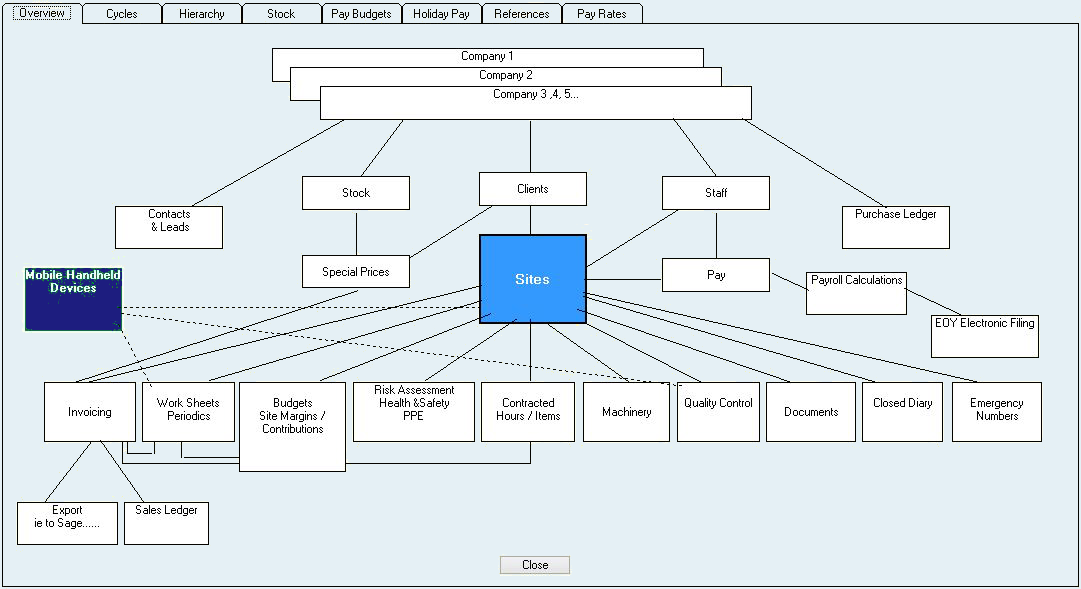
Site Manager has been developed to save you time and effort by auto-processing Invoices, Pay, Work Sheets Quality Audits and Management Reports in regular Cycles.
Cycles are repetitive routines that can be set up and run at a required time and frequency, e.g. monthly invoices, weekly pay, weekly Quality Audits and/or monthly Management Reports.
When opened, all Cycles are copies of the regular data due for that cycle, or period. Any alterations that are made (Add, Delete or Modify) will only apply to that particular cycle and do not alter the regular data. Any regular lines added after a cycle is opened do not update the open cycle.
You can jump to the regular data and make permanent changes.
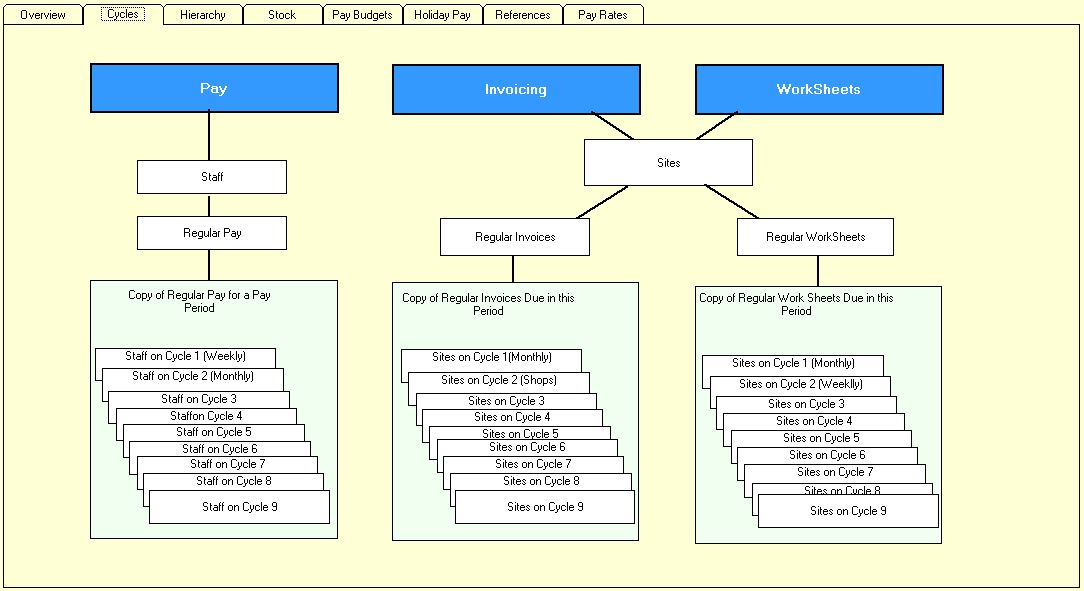
Invoices are grouped into logical cycles e.g. Monthly, Weekly etc. The invoice lines are set up in Sites, and when the cycle is opened, all invoice lines due will be included. They can then be edited.
One Off Invoicing is available to send ad hoc invoices.
One Off Work Sheets has the facility to create an invoice for the job; the invoice is placed in the One Off invoicing register with a HOLD flag.
Invoices can be exported (i.e. to Sage) and payments entered against the Client, either individually or batched. You need to decide where credit control is performed, either in CleanLink or your external accounts package.
Chargeable stores issued will be invoiced at the standard price unless there is an entry in the Clients ‘Special Price’ table. Any store can be barred from being issued. If a stores budget is set you will not be able to issue more than the budgeted amount, this is spread over two months to allow for fluctuations.
Stores are held at Depots, this is the physical place stores are held. External stores are stores direct from external suppliers, delivered DIRECT to the site.
Stock can be ordered and when received from suppliers the number updated in the Depot.
NB: When a pay cycle is opened, active sites with staff with regular pay will be included. If someone is not on an active site, with regular pay, they will not be included. NO ONE CAN BE PAID unless they are on an active site.
If you have floating staff, say an emergency team, or pay telephone sales people, set up a Client, as your company name or if you would like it at the bottom of the list ‘Z Internal’ or similar, create as many sites as required e.g. Emergency, Window Cleaners, Tele Sales, Salesmen, Office Staff and Management, each can have budgets and be restricted to the operational hierarchy like an ordinary site, a sales manager could do the pay for telesales and salesmen but not see the others. Obviously you will not have any invoices set up so the sites will not be included on any invoice cycles.
If you have staff that may or may not be paid but want them included on each cycle to remind you to consider them, attach them to a ‘catch all’ site, but without any pay entered. You can then review this site and move them to the correct site for payment.
Pay amendments can be stopped from going over budget by switching on ‘Over Pay Budgets’, in ‘Setups>2.Setups and Defaults’ this allows you to choose how many periods this checks for, so if set to two periods and the last period was £10 under it would allow £10 over in the next period. There is an override if you have the password.
Work Sheets are good for regular repeatable jobs performed by regular operators, e.g. cleaning windows every week, scrubbing floors every month. You can set up jobs, the frequency and when they are next due. When the cycle is opened all the jobs due are collected. Whole page work sheets, which can be signed by the client, with an option for a Time Sheet, and/or a one-line list, can be printed. No invoice is created, as this work is expected to be present in the regular invoice lines so tick the ‘Regularly Invoiced’ box. If the box is left unchecked it is entered in the table of un-invoiced Work Sheets.
If you have jobs but don’t know at this stage who is going to do them, setup a Contractor as say ‘Team A’ and assign this contractor to the job, even though your own staff are going to do the job. You can then print all the jobs due for, say, next week and then give them to the person doing the job.
Periodics is a specialised way of handling jobs that need to be done on a more ad-hoc basis and require arranging. These can be setup with an interval frequency. An invoice is produced which can be changed when the job has been completed. A Date Order list is displayed and when the job has been completed the frequency date is automatically updated.
Cases are logged through Site QC Tab or Right click and select Cases. Active cases are shown when you log in, every 30 minutes (a nag screen) or Right click the mouse and select Main Menu. The user will only see cases for their own Sites. Memos may also be added and will not show until the due date.
QC is typically used to schedule site or client visits or contacts and produce instructions. Each instruction has the facility to log a Response. Contacts can also be logged for ad-hoc Sites. The log produces a history of contacts with each site, or perhaps more importantly the lack of contact. The report ‘Report Visits’ can report Sites contacted or not contacted, within a date range.
Risk Assessment is accessed through Clients > Site > RA tab. You can set up a company-wide list of standard hazards and apply any number of them to the Site and alter them. Each Hazard has a Likelihood and Severity, these calculate a Hazard Rating.
Assessment Dates and Comments are stored. Reports can be produced by Hazard, Category and Next Due Date. Personal Protection Equipment can be logged.