Amending Invoices |
  
|
Amending Invoices |
|
When amending invoices you have the choice to either amend the regular invoice or amend only invoice for the current cycle. The steps for these options are set out below.
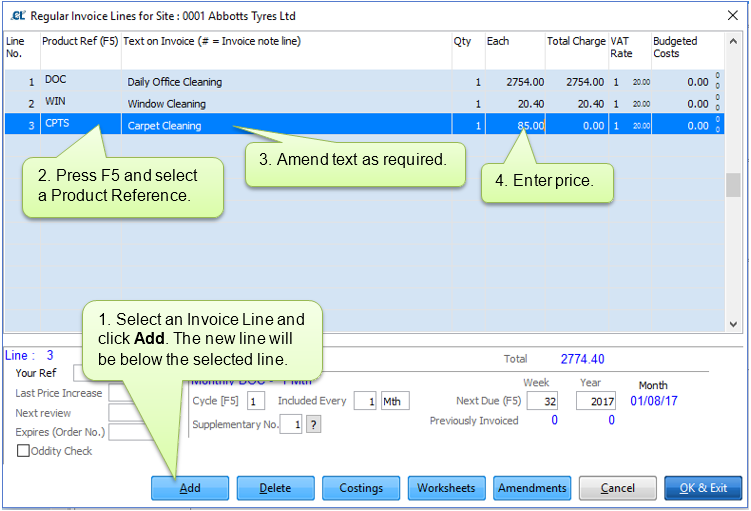
To amend a Regular Invoice navigate to Clients > Sites > Invoice Regular. Please note that changes made here will not affect any "In Progress" cycle.
Adding a new line:

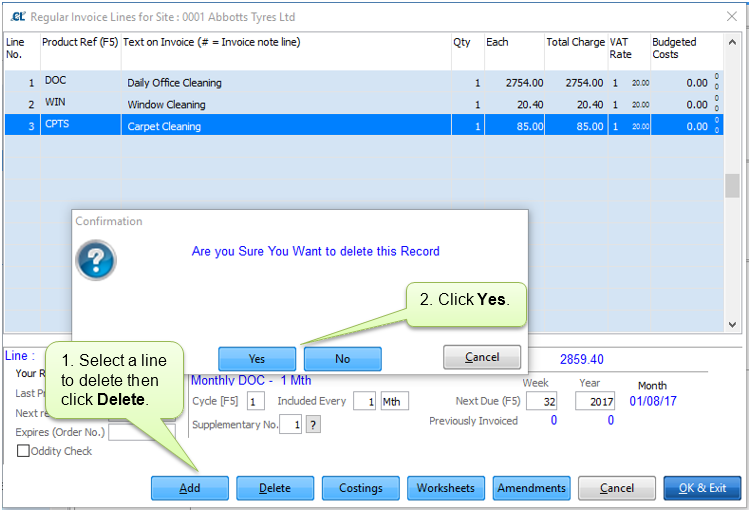
Deleting a line:
An invoice for an "In Progress" cycle can be amended through either Clients > Sites > Invoice Current > Invoice Lines or from within the cycle in All Sites Summary > Select Site > Invoice Lines.