Assigning Staff to a Site |
  
|
Assigning Staff to a Site |
|
Once you have created the staff record you are able to allocate them a regular job. This will mean when you open the relevant pay cycle they will be included with their regular hours. Allocating a job is also required if you are using the CleanLink Mobile App and want to have staff details displayed.
It is possible to create a regular job from either the Staff record or the Site record. To do so from the Staff record, follow this process:
Go to 'Staff' Tab and select the required staff member and then click 'Jobs'
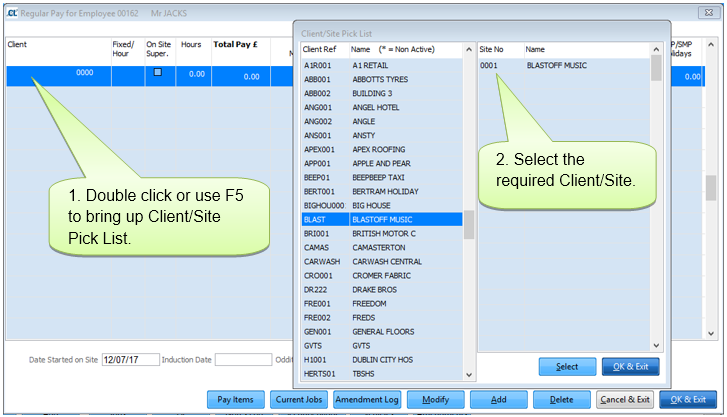
Add the Site to the table using double click or F5 button in the Client/Site field.
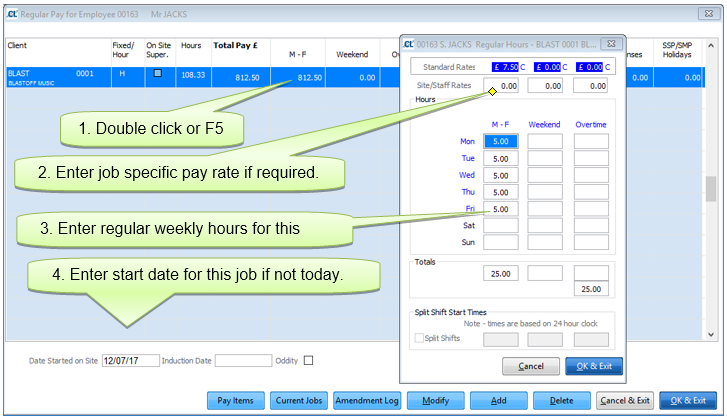
If hourly paid, enter hours using double click or F5 key in the Yellow column. From here it is also possible to set the job specific pay rate.
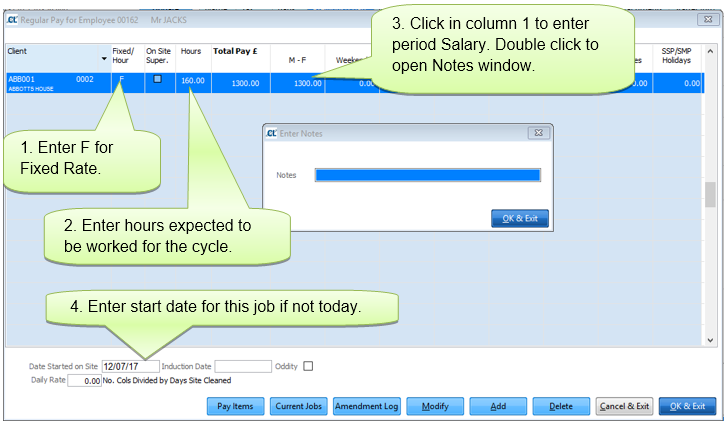
For Fixed Rate Paid staff enter ‘F’ in the Fixed/Hour section and then enter the salaried amount in required column. Note: Instructions on setting up pay codes/columns can be found in Setting up Payroll section of the help file.
Press 'Exit' when completed