Setting Up QC Cycles |
  
|
Setting Up QC Cycles |
|
As with other CleanLink systems it is possible to set up QC cycles on a weekly, 2 weekly, 4 weekly or monthly basis.
To create a QC cycle, go to Setups > N. Report and QC Cycles > B. QC Cycles Select the Add button to add the new cycle.

Complete the pop-up boxes for entering the Start and Finish Dates for the new cycle that you are creating.
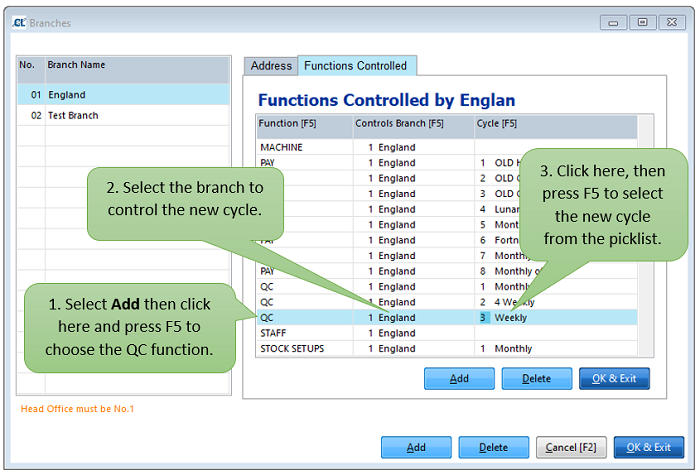
Go to Setups > C. Branches > Functions Controlled to set up which branch controls the cycle.
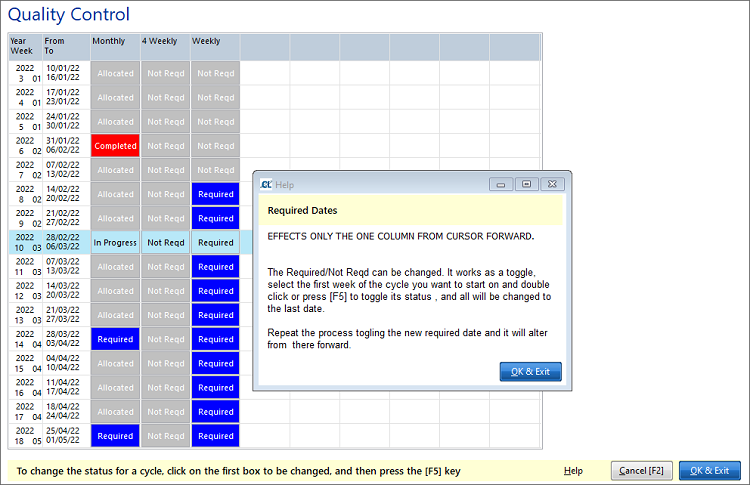
Go to Setups > P. Event Calendar > E. Quality Control and follow the on-screen instructions to set up the periods that the cycle is required for.