Site Risk Assessments |
  
|
Site Risk Assessments |
|
Risk Assessments involve the process of evaluating the risks to employees and others from hazards that are present at a site. An important part of the process is identifying steps to manage, minimise or eliminate each risk and to regularly assess whether those steps are being taken.
CleanLink's Risk Assessment functionality is accessed via Clients > B. Maintain Sites > RA tab.

CleanLink is set up with a list of 50 standard site hazards. To access these, select the Hazard Master List button. Check through the clauses, and add, delete or modify as required.
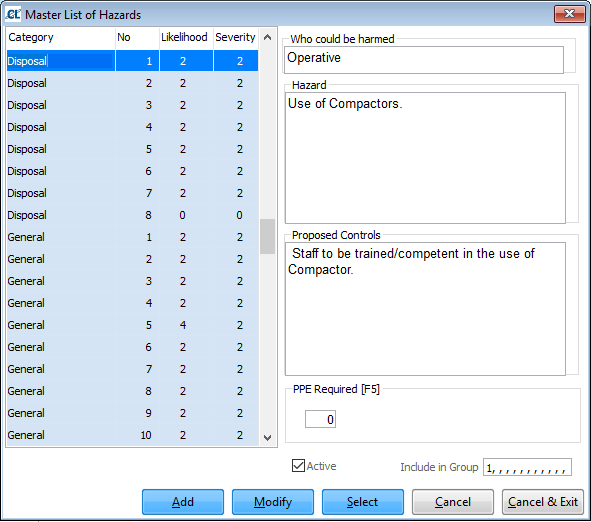
Each Hazard has a Likelihood rating and Severity rating.These can be amended and added to, and then any number of them applied to a Site.
Likelihood
Unlikely 1
Improbable 2
Likely 3
Highly Probable 4
Certain 5
Severity
Minor injury 1
Injury/lost time/Illness 2
Serious injury/Disablement 3
Death/Fire 4
The Hazard Rating = Likelyhood x Severity
Hazard Rating Action
1 & 2 Not Significant No Action
3 & 4 Very Low Risk 6 Months
5 - 7 Low Risk 1 Month
8 – 10 Moderate Risk 1 Week
11 - 14 High Risk 24 Hours
15 – 20 Very High Risk NOW
On the Site Hazard table the line will be coloured as above to show the high risks.
Hazards can also be grouped together and that group of hazards applied to a site. A hazard can be added to a number of hazard groups. Use the Include in Group field to define groups by adding hazards as required.
Going back to the Site Hazards tab, once applied and defined at a Site, each Hazard can then be altered specifically for that Site.
Each Hazard has a Hazard Rating, which is calculated by multiplying the Risk Rating and Severity Rating at that Site.
For each hazard, the Who could be harmed, Hazard and Proposed Controls fields should be completed. Personal Protective Equipment (PPE) can also be specified by using the PPE Required field
On the Risk Assessment screen, select the RA - Risk Assessments tab.
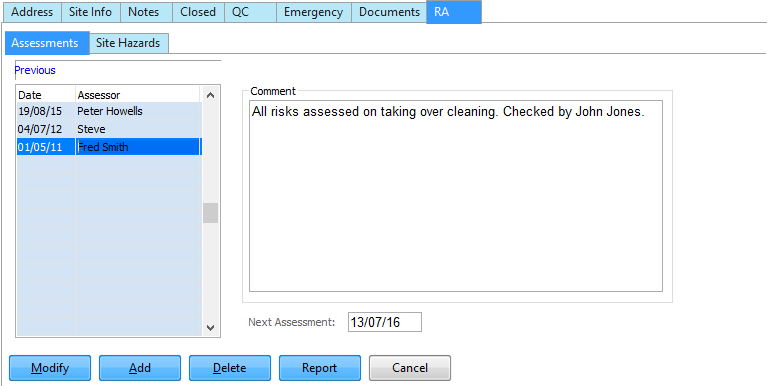
Assessment Dates and Comments are stored. Reports can be produced by Hazard, Category and Next Due Date. Personal Protection Equipment can be logged.
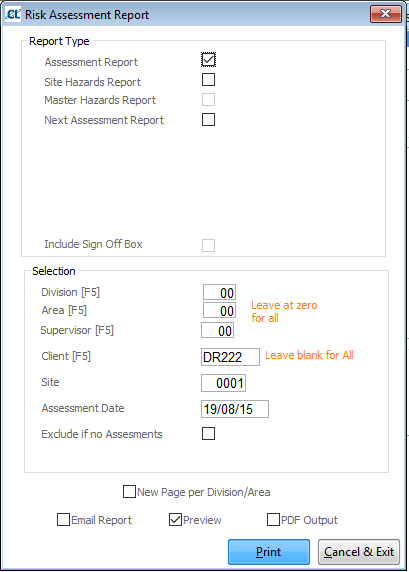
The Report button on the Risk Assessments screen displays the following dialogue box enabling reports to be selected and printed: